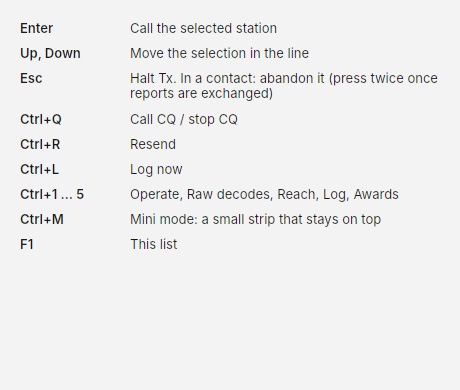
Keyboard shortcuts
In FT8 and FT4, press F1 in Costas to see this list. In PSK31, PSK63 and RTTY F1 sends your CQ macro, so open the list from ☰ › Keyboard shortcuts instead.
| Key | Action |
|---|---|
| Enter | Call the selected station (does nothing during a contact) |
| Up, Down | Move the selection in Next in line |
| Esc | Halt Tx. In a contact: abandon it. Once reports are exchanged, the first press only stops transmitting and keeps listening; press again to abandon. With a list or menu open, Esc only closes it (and halts if you are transmitting) |
| Ctrl+Q | Call CQ / Stop CQ |
| Ctrl+R | Resend |
| Ctrl+L | Log now |
| Ctrl+1 to Ctrl+5 | Operate, Raw decodes, Reach, Log, Awards |
| Ctrl+M | Mini mode: a small strip that stays on top |
| F1 | This list |
PSK31, PSK63 and RTTY
On the Operate screen, typing always goes to the typing line under the conversation, wherever you last clicked.
| Key | While receiving | While sending |
|---|---|---|
| Typing, Space, Backspace | Edit the typing line | Go out as you type; Backspace takes back what has not gone |
| Enter | Send what you typed, or the next step's macro | A new line; on an empty line, back to receive |
| F1 to F12 | Send that macro | Add that macro to what is going out |
| Esc | Abandon the contact | Stop sending; press again to abandon the contact |