Making contacts
Costas runs the standard FT8 exchange for you, the same messages WSJT-X sends, so other stations cannot tell the difference. You start every contact; Costas never calls anyone on its own.
Calling a station
Pick a station in Next in line and click Call (or double-click it, or select it and press Enter). You can also double-click a CQ in Raw decodes.
The top card becomes the contact panel, and the red ON AIR banner shows while you transmit:
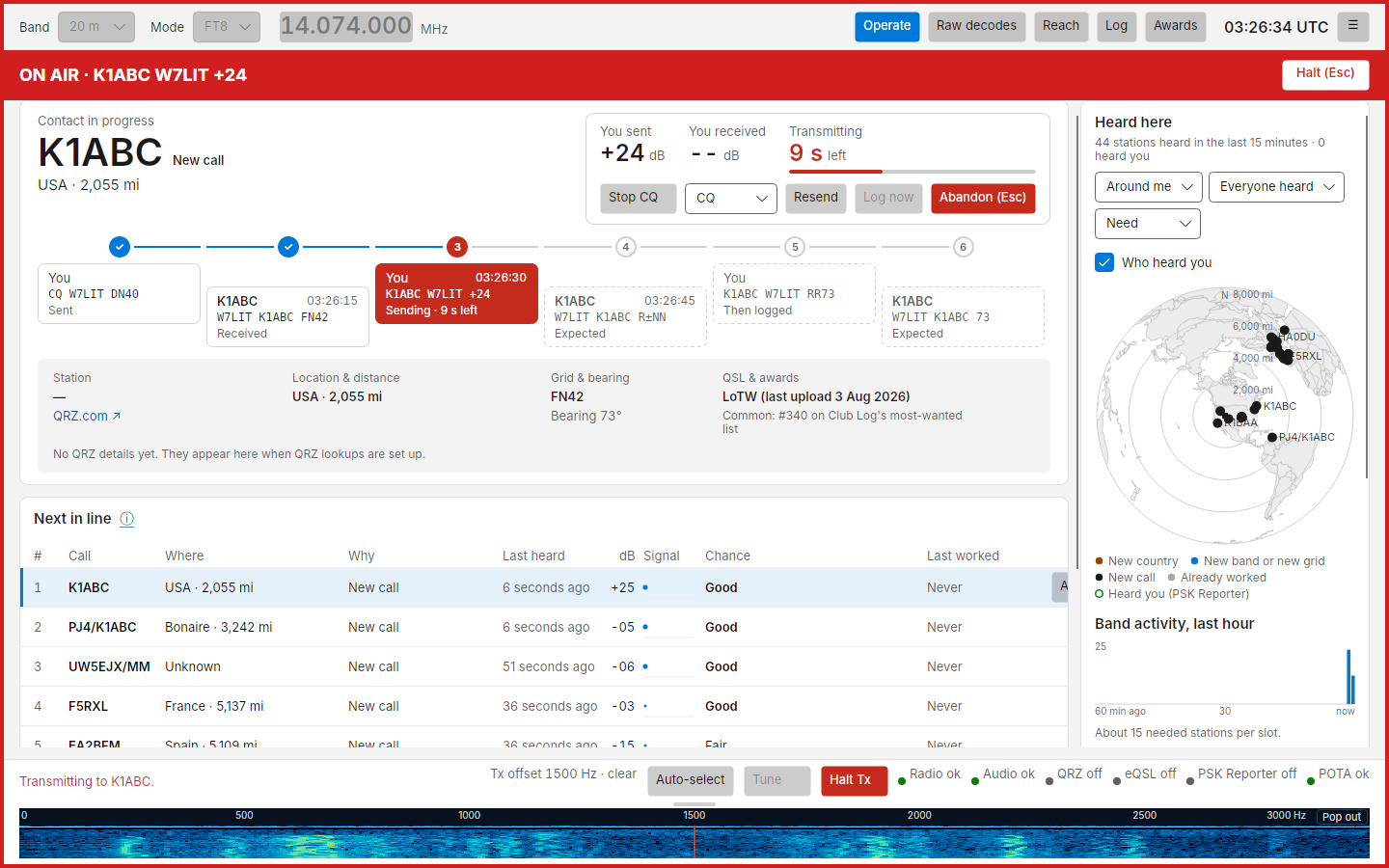
| Part | What it shows |
|---|---|
| Caption | Calling, then Contact in progress, then Logged (or Abandoned, No reply, In another contact) |
| Callsign and need tag | Who you are working, and why you wanted them |
| Subline | Name from QRZ (once the lookup arrives), country or state, distance |
| You sent / You received | The signal reports, as they are exchanged |
| Resend | Sends the current step again in your next slot. Ctrl+R |
| Log now | Logs the contact as it stands. Enabled once both reports are exchanged. Ctrl+L |
| Abandon (Esc) | Stops transmitting and ends the contact without logging it |
The conversation strip
Under the callsign, five boxes show the exchange. Yours sit higher, theirs lower:
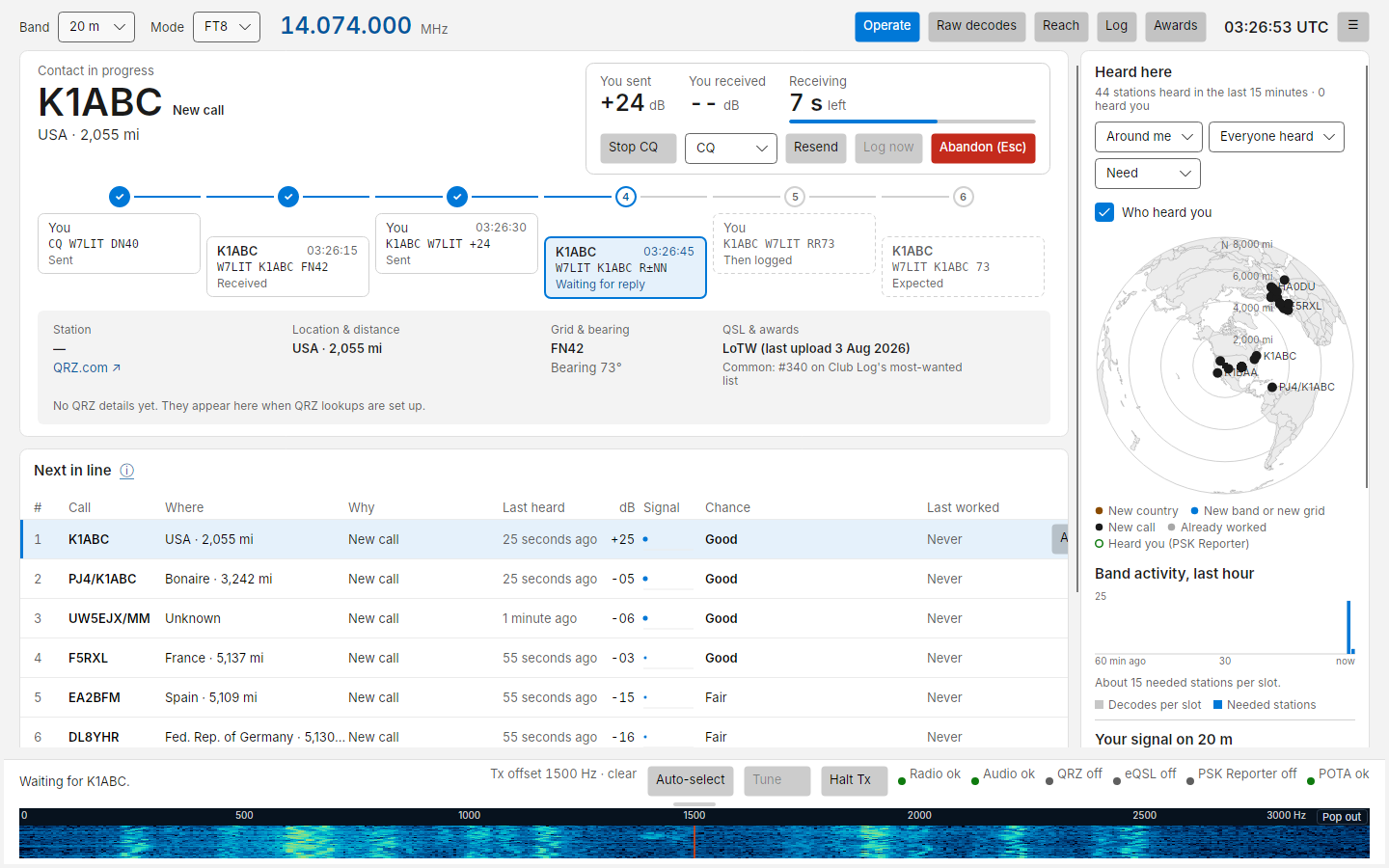
| Box | Means |
|---|---|
| Solid tinted | Done: You · sent 20:04:45 or F5RXL · received 20:05:00, with the message |
| Red | Sending now, with seconds left |
| Outlined | What Costas is waiting for, and when it is expected |
| Dashed | Still to come |
| ×2 | That step was sent or received more than once |
If you need to jump ahead or back, click one of your upcoming boxes: Costas sends that message next.
A typical contact answering a CQ:
- You:
F5RXL W7LIT DN40(your grid, unless you turned Send my grid off) - Them:
W7LIT F5RXL -13 - You:
F5RXL W7LIT R-03 - Them:
W7LIT F5RXL RR73. The contact is logged (and uploaded to QRZ) at this point. - You:
F5RXL W7LIT 73, sent once as a courtesy (orRR73, see Last message when answering in Settings).
When the other station does not answer, Costas tries again, and gives up after the number of tries set in Settings › Transmitting › Give up after (4 by default). If they repeat themselves, Costas steps back and resends what they missed.
If the station you called answers someone else before it has replied to you (it sends its report or grid to another call), Costas stops calling it straight away. The panel shows In another contact for one slot with the reason under the callsign, for example F5RXL answered K1ABC instead. Stopped calling. If you call a station that is already exchanging reports with someone else, Costas sends nothing and the panel says F5RXL is in a contact with K1ABC. Not calling. If they come back to you within 5 minutes, they show in the Calling you bar with a Resume button, as below. A station that only signs off an earlier contact (RR73, 73) or calls CQ again does not end your call.
After logging, the panel shows Logged for one slot and then goes back to the band summary. The station drops out of Next in line (it is now worked on this band) and your tallies update:
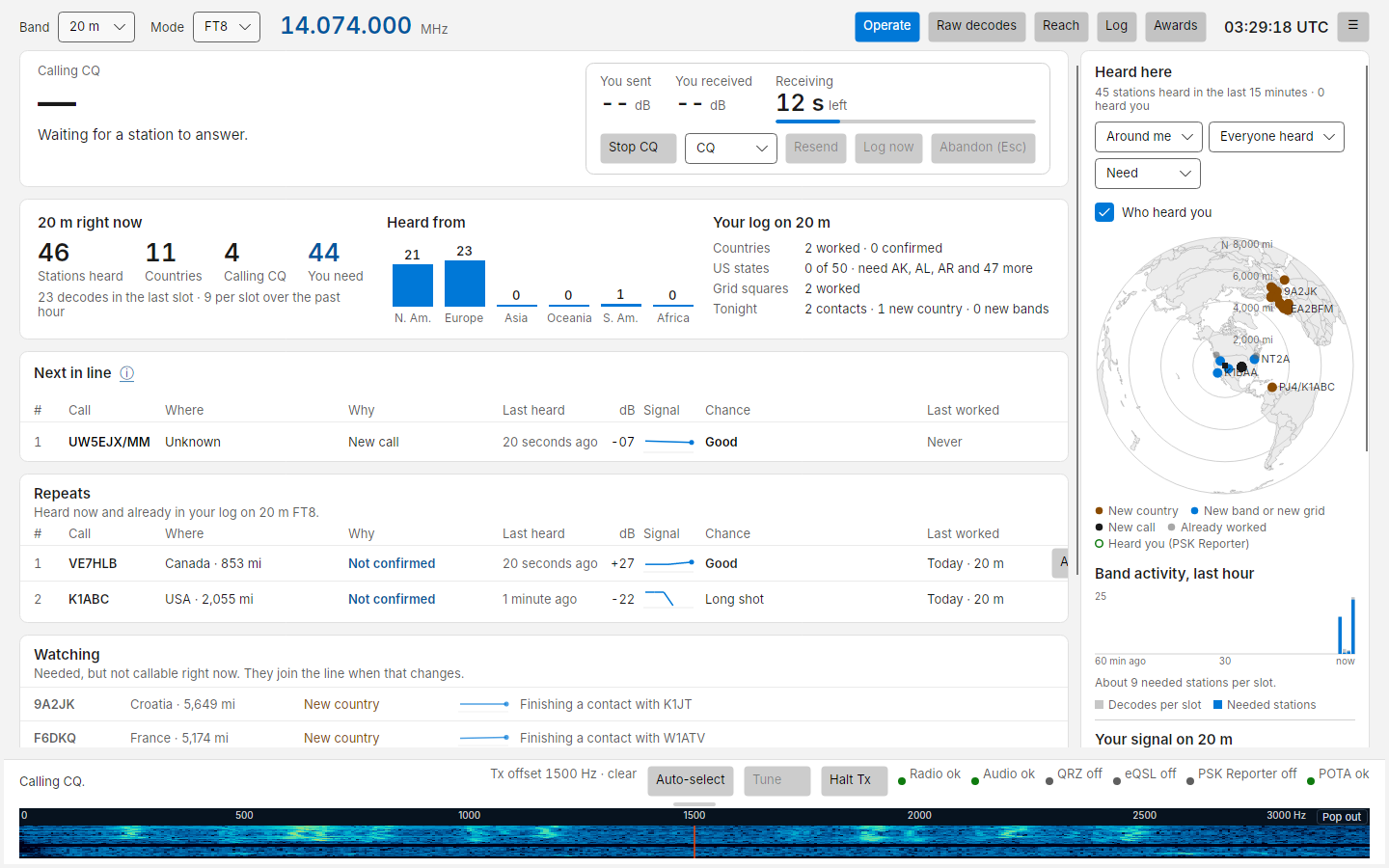
A Logged notice also appears in the bottom-right corner of the window, over the right-hand column so it never covers the contact panel or Next in line. It names the call, what it was new for, where it is, the band and mode, the power logged and the reports, and closes itself after 5 seconds with a bar counting down. Resting the pointer on it keeps it open; ✕ closes it at once. It never takes the keyboard, so Esc still halts. When you are running CQ and the next caller takes over the panel straight away, the notice is how you see the last contact went in the log.
Click the notice to correct the contact before it leaves your PC: it opens in place with the call, grid, reports, name, power and comment. Save stores the change and then sends it; Cancel sends it as logged. The contact is in your local log from the start, but the upload to QRZ, eQSL and LoTW and the WSJT-X UDP "logged" message (GridTracker, other loggers) wait until the notice closes, about 5 seconds, or for as long as the editor is open. An open editor does not time out. If Costas closes while a contact is held, it is sent on exit.
Calling CQ
Click Call CQ (or press Ctrl+Q). Costas calls CQ in the parity set in Settings › Transmitting › Call CQ in (even or odd slots) until you click Stop CQ. A contact that has just ended (Logged, No reply and so on) leaves the panel as soon as you click, so the boxes are clear for your CQ. A contact still in progress is kept and finished first.
To call a part of the world, pick it in the dropdown beside Call CQ: CQ for everyone, CQ DX for stations outside your country, CQ NA, CQ EU and the other continents, or CQ POTA. It applies from your next CQ, and is the same setting as Settings › Transmitting › CQ.
When someone answers, Costas starts the contact with the first caller. Anyone else who calls you meanwhile waits in the Calling you bar.
The Calling you bar
When a station calls you and you have not answered, a bar is pinned above the top card, outside the scrolling area, so you cannot miss it:
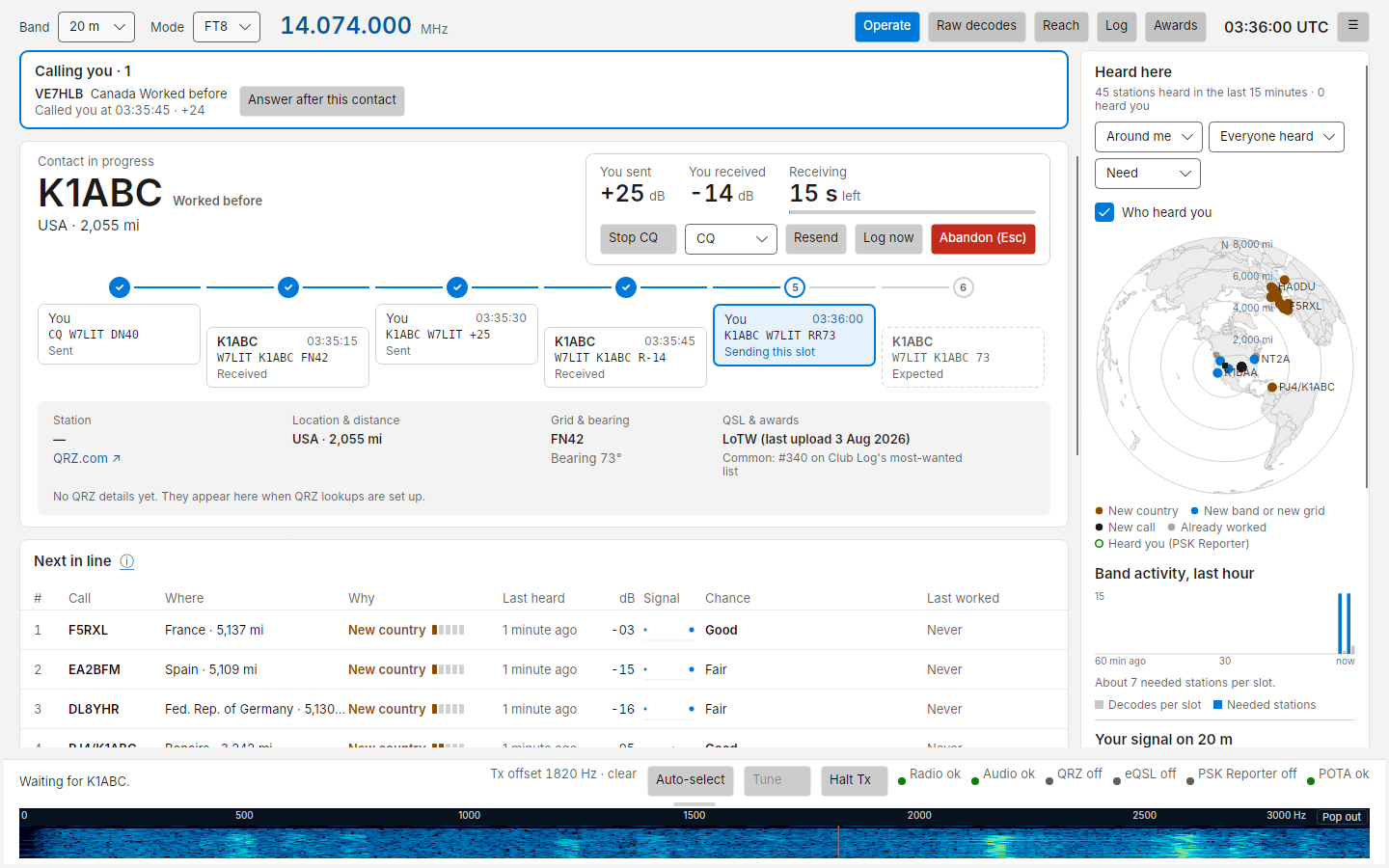
Each caller shows callsign, where, need tag and Called you at 20:07:15 · +25. Up to 5 callers, oldest first.
- While you are in a contact the button reads Answer after this contact. Click it and Costas answers that station as soon as the current contact ends (the button then reads Will answer after this contact).
- When you are not in a contact it reads Answer and answers in your next slot.
The same station also appears in Next in line with Calling you under Doing now and an Answer button, which does the same thing.
Chime: Settings › Transmitting › Calling you › Chime when a new station calls me plays a short sound when a new caller appears. It is off by default. It plays on the computer's default speakers, and stays silent if the default device is the radio's audio device, so it can never go out over the air.
Late replies and Resume
If you stop a contact (Abandon, Halt, or it ended with no reply, by the watchdog or because they answered someone else) and that station then replies within 5 minutes, it shows in the bar with Replied after you stopped: W7LIT K1ABC R-13 and a Resume button:
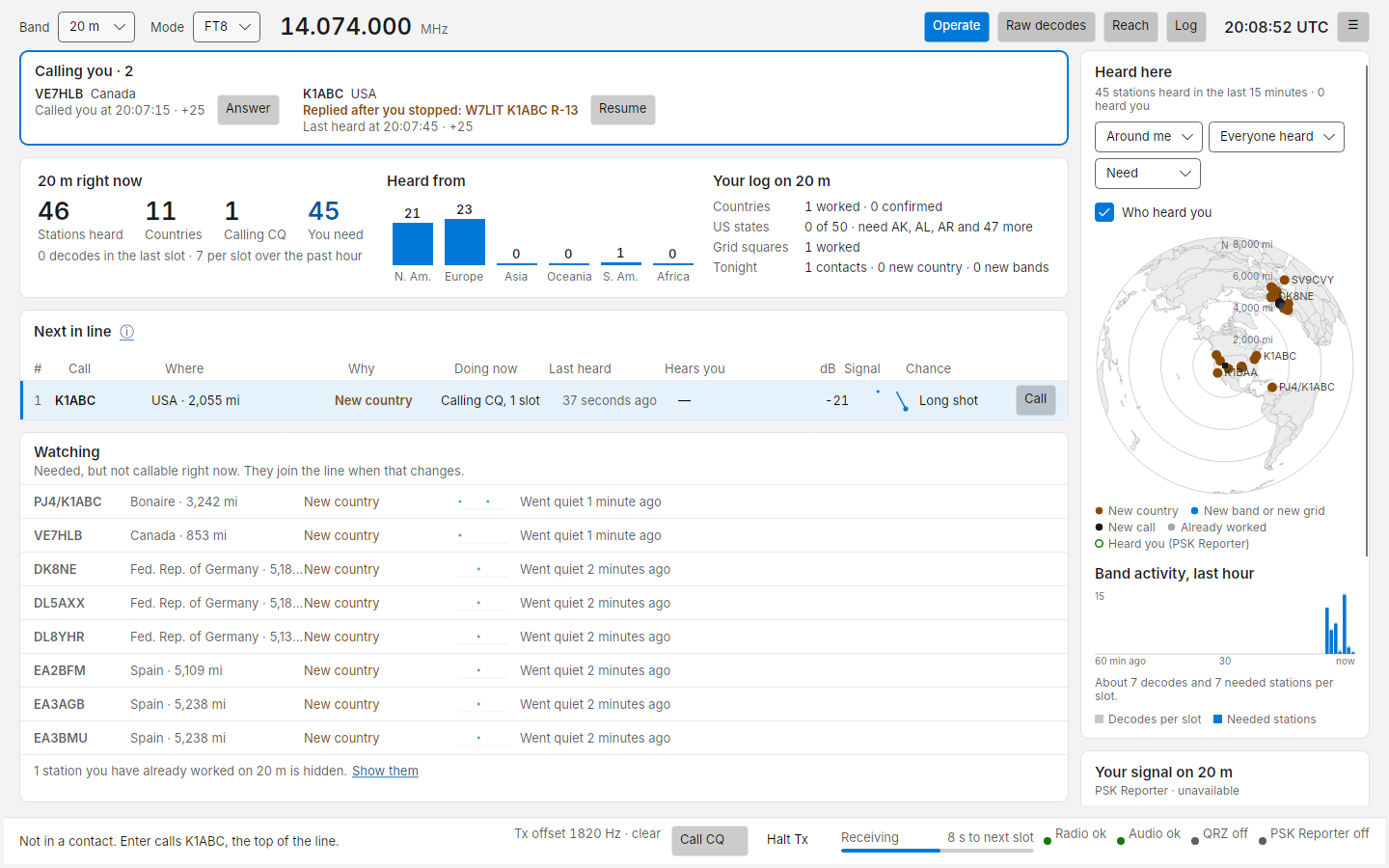
Nothing is sent until you press Resume. Resume picks the contact up where it was, as if their late message had arrived in time: a late RR73 logs the contact and sends 73, a late report gets your R-report.
Working a DXpedition (Fox/Hound)
Many DXpeditions run Fox/Hound: the DXpedition (the Fox) transmits below 1000 Hz, in the first slot of each pair,
and works several callers (Hounds) at once. Hounds call above 1000 Hz and must follow its rules, or the Fox never
hears them. Costas spots a Fox when it sends a multi-answer message such as K1ABC RR73; W7LIT <KH1X> -12, or
two messages in the same slot on different frequencies (one per stream), and shows it in Next in line as
DXpedition (Fox/Hound), working Hounds. There is nothing to switch on:
- Tune the radio to the DXpedition's frequency (they usually announce it; it is rarely the standard FT8 one).
- Click Call on the Fox. Costas works it the way WSJT-X's Hound mode does, and every other station as usual:
| Step | Who | Message | |
|---|---|---|---|
| 1 | You | KH1X W7LIT DN40 |
Repeated on your own offset, always 1000 Hz or more |
| 2 | Fox | W7LIT KH1X -12, or K1ABC RR73; W7LIT <KH1X> -12 |
|
| 3 | You | KH1X W7LIT R-08 |
On the Fox's frequency; the report is how strong the Fox was when it answered you |
| 4 | Fox | W7LIT KH1X RR73, or W7LIT RR73; K1ABC <KH1X> -12 |
Logged. You send nothing after it |
While you work a Fox, the contact card shows a Hound mode tag next to its caption, with a line saying what happens now: where you are calling and for how long, then that your report goes back on the Fox's frequency. The strip has four boxes instead of five, because a Hound sends no 73. On the phone remote the caption reads Calling · Hound mode.
- If the Fox doesn't answer within 2 minutes, Costas stops calling and says so. Click Call again to keep trying, as WSJT-X asks you to re-enable Tx every 2 minutes.
- Once the Fox has sent your report, Costas keeps sending R-reports until its RR73 arrives, for up to 11 slots after its latest report.
- A Fox is always working someone, so Costas doesn't stop calling it when it answers other Hounds.
- A Fox that has only been calling CQ looks like any other station, so if you click Call then, Costas starts the ordinary way. As soon as the Fox shows its signs while you are still calling, the contact switches to Hound mode: your calls move to 1000 Hz or above and the 2-minute calling limit starts. Fox/Hound DXpeditions send multi-answer messages nearly every slot, so this is rarely more than a moment.
- Your R-report goes out below 1000 Hz. On some radios very low audio lets harmonics through; keep the transmit audio clean (the automatic level helps), and watch the ALC warning.
- SuperFox DXpeditions (WSJT-X 2.7's SuperHound mode) can't be worked yet: their signal needs a decoder that
Costas can't run until it keeps
jt9running between slots.
Halting
Halt Tx in the bottom bar, Halt (Esc) in the ON AIR banner, and the Esc key all drop PTT immediately and stop the sequence.
Before both reports have been exchanged, Esc abandons the contact at once. After that, the first Esc only stops transmitting: Costas keeps the contact and keeps listening, so if the other station's RR73 or 73 arrives the contact is logged (with automatic logging on) and nothing more is sent. Ctrl+R carries on transmitting where you left off, and a second Esc abandons the contact. A stray key press does not lose a nearly complete contact.
Clicking Call CQ after the first Esc clears that contact from the panel and starts your CQ. Costas still listens for the other station for 5 minutes: if their RR73 or 73 arrives, the contact is logged (with automatic logging on) and the Logged notice appears, with nothing sent to them and your CQ carrying on. If they send their report again instead, Costas answers it like any caller to your CQ.
Safety guards
These are always on:
| Guard | What happens |
|---|---|
| Watchdog | If you have not touched the app (key or click) for 6 minutes (Settings › Transmitting › Watchdog), transmitting stops: Stopped by watchdog. A contact the other station is already answering is finished first; CQ does not start again after it |
| Clock | Transmitting is refused while your clock is off by more than 2 s (Clock limit) |
| Band edge | Costas will not transmit outside the band's limits for the dial frequency and offset |
| Faults | Any radio or audio error releases PTT at once |
| No radio | With no radio set up, transmit is refused and the radio indicator says why |
| Exact messages | If a message cannot be encoded exactly as shown (for example an unusual callsign or a free text with characters FT8 cannot carry), Costas refuses to send it and says why, rather than changing it |
| Meters | Power out, ALC and SWR from the radio show in the bottom bar while you transmit and stay after it. A high SWR (orange at 2, red at 3) or ALC reading is coloured, with advice when you hover |
Logging
With Settings › Transmitting › Logging › Log each contact automatically when it completes on (the default), contacts are logged when the exchange completes. Otherwise use Log now. Either way the contact goes to the local log and, if set up, to your QRZ logbook. See Log, QRZ and ADIF.