Raw decodes
The classic message list, for when you want to see every line the decoder printed. Press Raw decodes in the top bar or Ctrl+2.
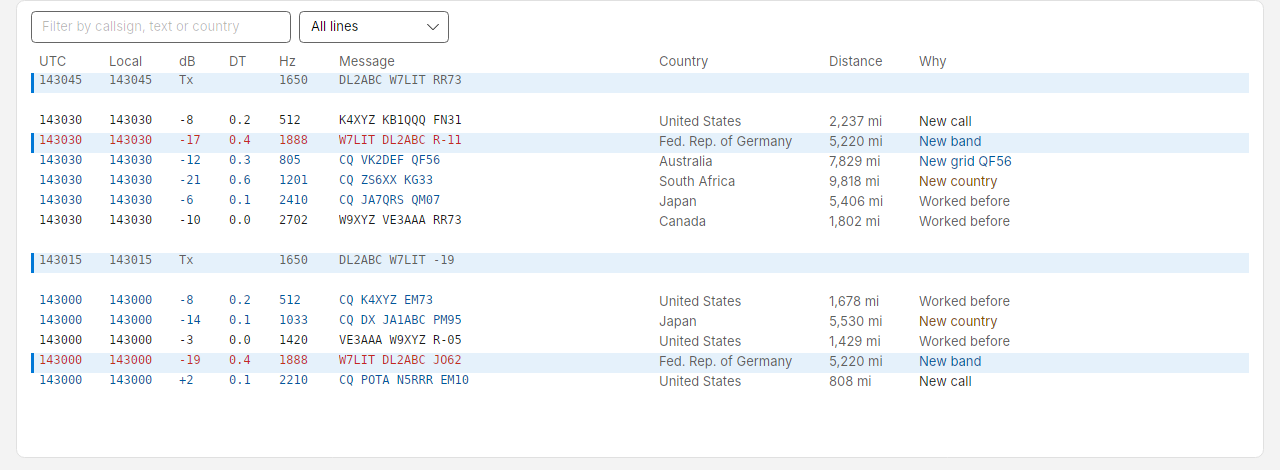
| Column | Meaning |
|---|---|
| UTC / Local | Slot time, HHMMSS |
| dB | Signal-to-noise ratio at your station. Your own transmissions show Tx |
| DT | Time offset of the signal in seconds. A median near zero means your clock is right |
| Hz | Audio offset in the passband |
| Message | The message exactly as decoded |
| Country | The sender's country, from the country file |
| Distance | How far away the sender is, in miles or kilometres as set in Settings. Blank until their grid is known |
| Why | What working the sender would add, as in the station list: New country (orange), New band or New grid (blue), New call, or Worked before |
- The newest slot is at the top, with a blank line between slots.
- The list shows only the mode you are in. Switch from FT8 to FT4, PSK31, PSK63 or RTTY and it shows that mode's lines; switch back and the earlier lines are still there. The phone remote's Decodes tab does the same.
- Messages to you are red; CQs are blue.
- Lines from the station you are in a contact with, and your own transmissions to them, have a tinted background and a blue bar on the left, so you can follow the contact through a busy band.
- Scroll down to read older lines and the list stays put while new slots arrive; Jump to live takes you back to the top.
- Type in Filter by callsign, text or country to show only matching lines.
- The Show menu beside it narrows the list to CQs, lines To or from me (messages to you and your own transmissions), or New country, band or grid. While anything is hidden, the count reads, for example, "5 of 212 lines", and Clear filters shows everything again.
- Double-click a line to call its sender.
- Right-click a line for Call its sender, Show only that callsign, or Copy line (laid out as WSJT-X prints it, for pasting into a chat or a bug report).
- In FT8, most lines of a slot appear about 12.5 s into it, before the slot has ended, and the rest shortly after it. Costas keeps the decoder running between slots and starts on each slot early, as WSJT-X does. The station list and the slot's counts update once the slot is complete.
- A portable or compound call that was sent as a short code shows in angle brackets, for example
<PJ4/K1ABC> W7LIT DN40. Costas fills in the call once it has heard it in full (in a CQ, say), so it can be called like any other station. Until then it shows as<...>and cannot be called. - Programs such as JTAlert and GridTracker can colour callsigns here (for example, ones you need), as they do in WSJT-X. See Other loggers.