Maps and who hears you
Costas has two maps. Heard here shows who you hear. Reach shows who hears you, from PSK Reporter. Both are centred on your grid square, so set it in Settings › Station first.
Heard here
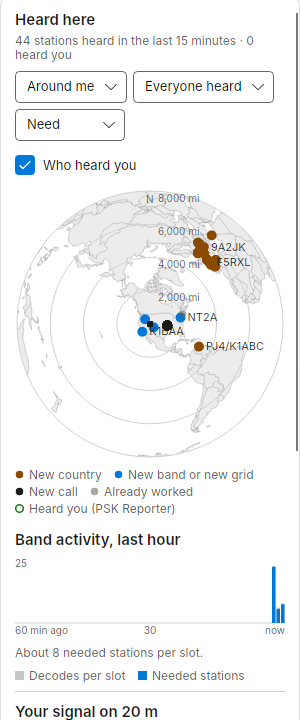
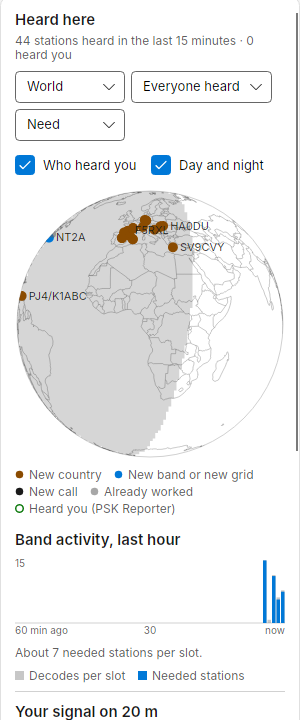
The first card in the right column of Operate. Each dot is a station you decoded in the last 15 minutes. Hover over a dot for its call, place, need, report and when it was heard. Your choices are remembered.
| Control | Options |
|---|---|
| View | Around me: centred on you, north up, with distance rings. World: a globe, see below |
| Show | Everyone heard, Needed only, Calling CQ |
| Colour by | Need (new country amber, new band or grid blue, new call black, worked grey), Signal (strong, fair, weak), Last heard (last minute, 1 to 5 minutes, 5 to 15 minutes) |
| Who heard you | Adds a hollow ring for each PSK Reporter receiver that heard you in the last 15 minutes. A station you hear that also hears you shows as a dot inside a ring |
| Day and night | World view only: shades the night side of the earth, so you can see the greyline |
The globe (World view, here and in Reach) starts facing your station and spins slowly. Hovering pauses it so you can read a dot. Drag it with the mouse to turn it to any part of the world, east and west or up and over towards the poles; once you have turned it, it stays where you left it. Double-click it to come back to your station and start the spin again.
The legend under the map says in words what each colour means. Labels that would overlap are dropped; hover to see them. Without a grid, the map falls back to the World view and asks you to set your grid.
Reach view
Press Reach in the top bar (Ctrl+3), or Open reach view under Your signal in the right column.
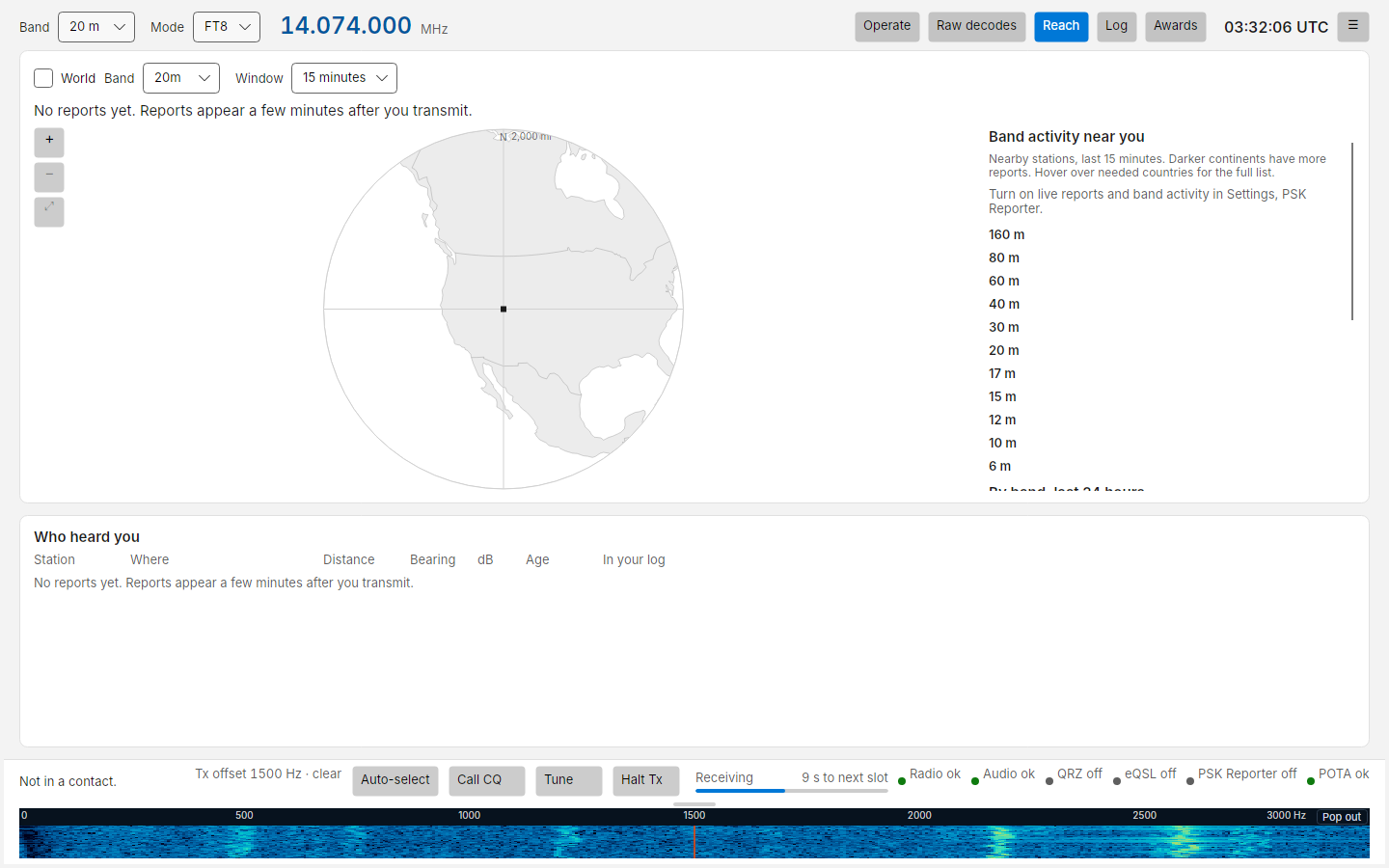
- Band and Window (15 minutes, 1 hour, 24 hours) choose which reports to show. Only reports in the mode you are in are shown.
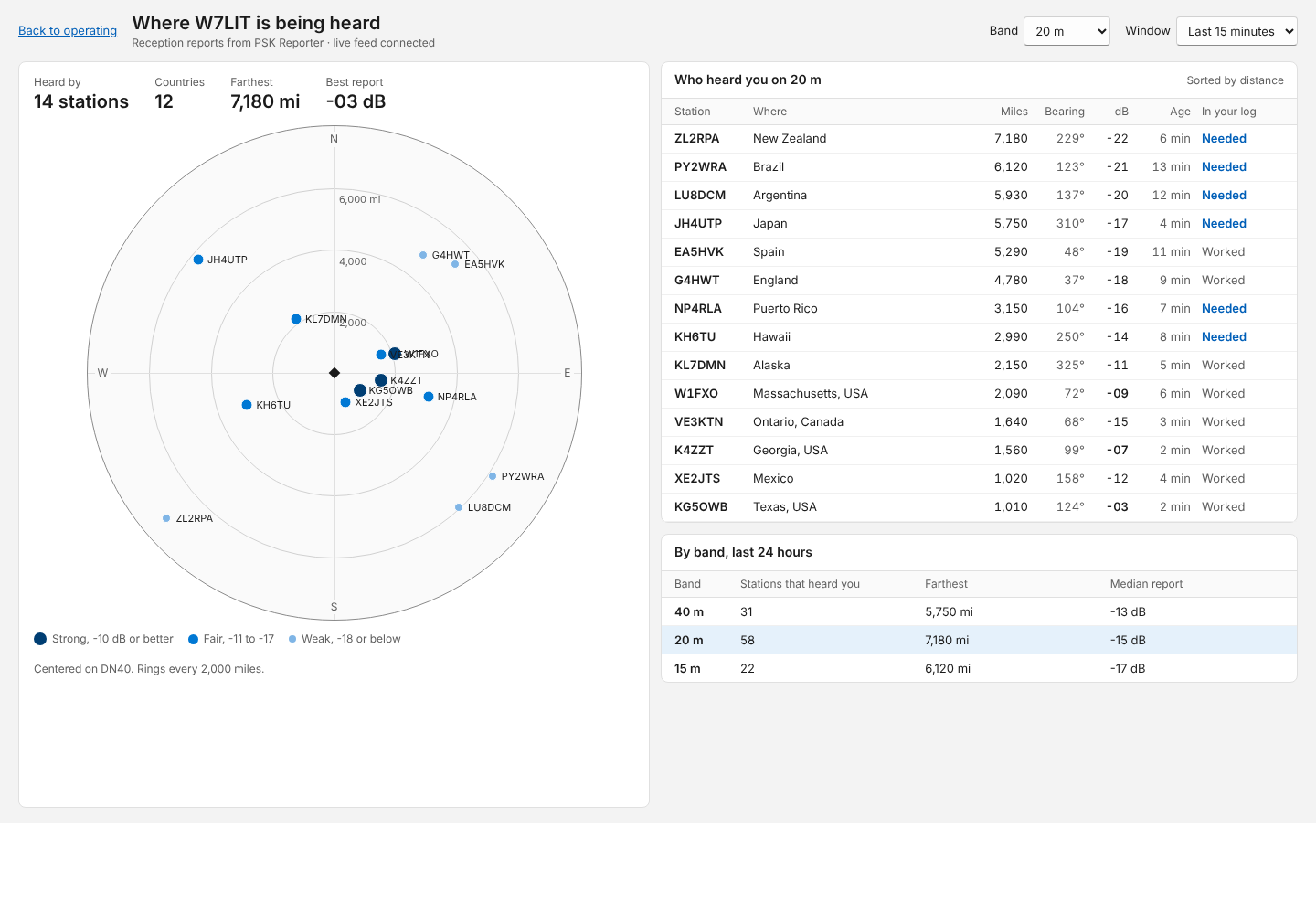
- Headline: heard by how many stations, in how many countries, the farthest and the best report.
- World: switches the plot for the globe, with a ring for each station that reported you. Drag to turn it, double-click to come back to your station (see the globe above).
- Plot: you are at the centre, north is up, with rings every 2,000 miles (or 3,000 km). Each dot is a station that reported you, at its bearing and distance. Bigger, darker dots are stronger reports: strong (-10 dB or better), fair (-11 to -17), weak (-18 or below).
- Who heard you: the reporting stations with where, distance, bearing, dB, age and whether they are in your log. Sortable. Double-click a row for that station's details.
- By country: each country that heard you on this band in the selected window, with how many stations, the best report and the farthest distance. Most stations first. Hover over a row for who gave the best report and who was farthest.
- By band, last 24 hours: how many stations heard you on each band, the farthest and the median report.
- Compared with stations near you: is it the band, or your station? PSK Reporter also hears the other stations within 300 miles of you. For every receiver that heard both you and one of them in the last 30 minutes, Costas compares the two reports, then sums it up per continent: 7 dB weaker than stations near you into Europe. A continent shows once 3 receivers have heard both. The same line appears under Your signal on the Operate screen. Bear in mind a neighbour running more power than you makes you look weaker.
- Did a change help?: Costas keeps a daily summary of that comparison, so you can see whether a new antenna or amplifier made a difference. For the band and mode chosen at the top, each continent gets a line such as Into Europe: 4 dB behind neighbours this past week, 7 dB behind the week before. and a small chart of the last 30 days: one dot per day, the middle line is level with stations near you, below it you were weaker. Press Mark a change today on the day you change something (type what changed first if you like). The lines then compare the days since with the two weeks before: Into Europe: 2 dB behind neighbours since your change on 9 Oct, 7 dB behind in the two weeks before. The day you mark counts as after the change. Pressed again the same day, the button removes the mark.
What is stored: every five minutes, while the comparison has something to show, the difference for each continent
is added to that day's summary (UTC days), per call, band and mode. Only these counts and your marks are kept, in
neighbour-history.json in the Costas data folder, for about a year. No reports or calls of other stations are
stored. Nothing is recorded while the comparison is turned off in Settings, or in simulation. Deleting the file
starts the history again.
Band activity near you
Open Reach or the Band dropdown to see, before you switch, which bands are open from your area right now. For each band it shows how many PSK Reporter spots stations within 300 miles of you got in the last 15 minutes, which continents heard them (darker means more), and countries hearing them that you still need on that band, for example You need Brazil +2. Hover over it for the full list.
It needs Receive live reports of stations hearing my signal and Show band activity near me in Reach and the band menu in Settings. Costas uses the grid square in Settings › Station to follow nearby stations as soon as the feed connects, even before you transmit or your own signal is spotted. Changing that grid clears the old area’s activity and follows the new area. Without a valid grid, each row says Set your grid in Settings. In busy evenings PSK Reporter sends more reports than Costas can follow on every band at once. Costas then follows the band you are on and listens to the other bands one at a time, 30 seconds each, scaling what it hears up to 15 minutes. Those rows show an estimate with a tilde, such as ~1,200 spots, and the tooltip says how long that band was listened to. A row whose turn has not come yet says Checking soon; every band has numbers within a few minutes.
Reports appear a few minutes after you transmit. Until then the view says No reports yet.
The populated Reach view looks like this design mock-up (sample data):
Where the data comes from
Reports of your signal come from PSK Reporter, live through its MQTT feed, with a periodic query as a fallback, and from the Reverse Beacon Network (RBN), whose skimmers spot FT8, FT4 and RTTY around the clock. The caption under Your signal says which: PSK Reporter · live, · updated 6 min ago (fallback), or · unavailable, followed by · RBN live while RBN spots are arriving. A station that reports you to both networks counts once. RBN does not say where its skimmers are, so a skimmer that has never reported to PSK Reporter is placed in the middle of its country on the map. Turn either source on or off in Settings › PSK Reporter and RBN. Without them, the maps and the station list still work, but Chance comes from the signal alone.